

How an idea becomes a site-ready asset: from sample to prompt to PDP
The value that generative AI can bring to e-commerce production in 2026 is more promising than ever: faster timelines, lower costs, and endlessly customizable image variations. A recent industry report identified high-volume content generation and large-scale personalization as two of the highest-impact areas of integrating AI with e-commerce. But between that promise and the reality of content production lies the question: how do brands develop a consistent process for turning sample images into site-ready, on-brand AI assets—accurately and at scale?
Beyond choosing the right AI tools for their needs, brands must build an extensible workflow structure to connect every step of an iterative, often non-linear process. For e-comm teams managing thousands of SKUs across channels, introducing genAI can create more problems than it solves: endless iterations, inconsistent prompts, content overload, and ultimately, AI tools that don’t make it past the exploration phase.
Globaledit centralizes the entire AI production lifecycle so every asset lives in one place: on our platform, teams can intuitively organize the output from their experimentation, like internal tests and prompt documentation, then move onward to formal image generation all the way through to final asset delivery and publication. This end-to-end visibility means teams can identify exactly where AI makes sense as a production tool instead of—or alongside—traditional shoots, retouching, and post-production. As teams determine what tools and processes work best, this centralization and organization transforms genAI from a theoretical efficiency gain into a practical, repeatable workflow.
Here’s a look at how modern e-commerce teams at global retailers are harnessing genAI to turn swipe into Shopify-ready assets—and using Globaledit to get there.
Organizing and Accessing Reference Assets
Before an AI asset can be created, the image generator needs source material, whether it’s a product layflat, an on-model shot from an existing shoot, or an external reference. These files need to be easily accessible and well-organized so creative and e-comm teams can quickly find and pull them when they’re ready to generate new content. Globaledit is purpose-built to host any file format, and content libraries can be organized and re-organized non-destructively with dynamic collections and custom folder structures.
Once source materials are centralized in Globaledit, they’re immediately accessible within whichever generative AI tool your team may use. Whether that’s Caimera, Gemini’s Nano Banana, or another platform, pulling from a single, curated library ensures the AI content will maintain the quality and accuracy your brand demands from the start.
Generating & Iterating with AI
Once reference material is uploaded, teams can begin generating content, such as:
- Producing new product views from a single source image
- Transforming still life shots into on-model imagery
- Converting studio backgrounds into editorial environments and sets
- Localizing models and styling for regional markets and seasons
It’s an inherently iterative process: teams will run prompts, review outputs, tweak parameters, and run again; one source image can quickly multiply into dozens of variations as details are refined for the perfect result. Without proper version tracking, it’s difficult to trace the evolution of an asset or record which prompt produced which result—and harder still to recreate a successful output when something really works.
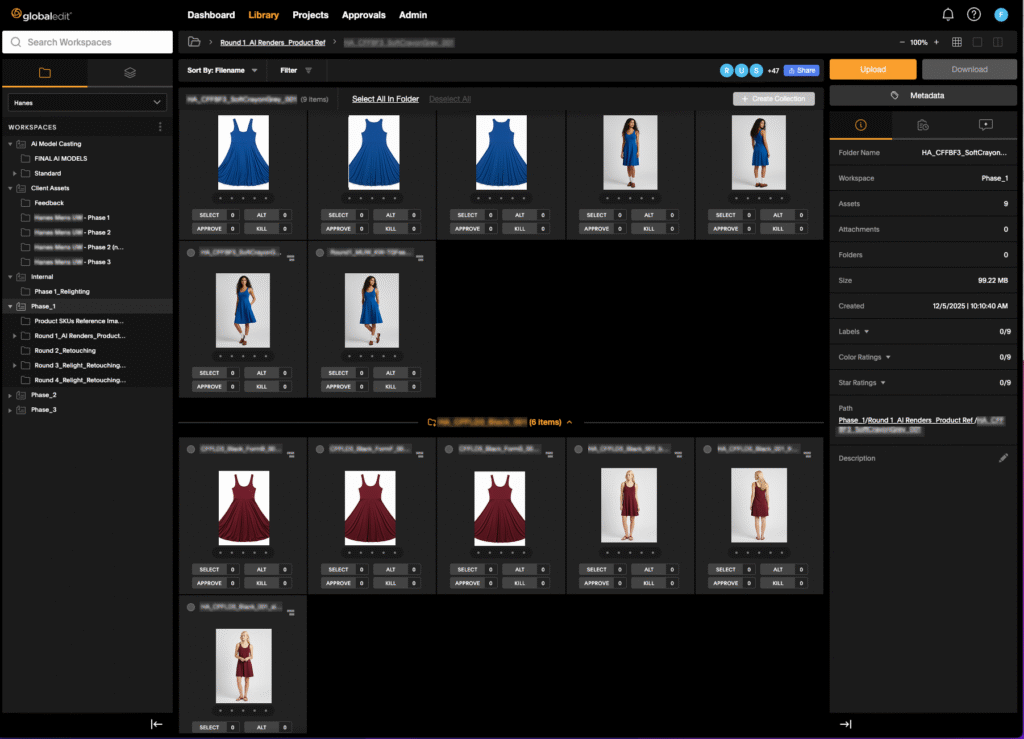
By integrating seamlessly with these AI models, Globaledit enables teams to save AI-generated assets directly back to their workspace, which is already equipped for downstream asset management:
- Complete version history tracks visual developments so teams can flip through iterations and retrace steps.
- Prompt documentation via comments and metadata fields guarantees reproducible results.
- Visual consistency: Centralized asset management eliminates outdated files and non-compliant visuals.
- AI auto-tagging: Assets are automatically and intelligently tagged for objects and faces once they’re saved, making them instantly searchable later on.
- Auto-cropping re-formats assets directly in-platform for heroes & banners, carousels, mobile and desktop versions, and more.
- Review & edit: Where human touch is needed, Globaledit’s native WIP, markup, and collaboration tools make retouching, feedback, and manual edits frictionless.
Distributing to Your E-comm Ecosystem
Once AI assets are saved straight back into customized workspaces and folders, other teams—e-commerce, digital, social, or external partners—can immediately pull them for their intended use on site, in social channels, and for marketing campaigns.
To automate another manual distribution step, Globaledit integrates seamlessly with essential project management, e-commerce, and storage platforms so assets are instantly accessible in the platforms they’ll ultimately live in.
- Project management: Google Workspace integrations keep shot lists and trackers automatically updated; Airtable, Monday.com, and Asana reflect real-time progress updates and task handoffs.
- E-commerce storefronts: assets flow straight to Shopify or WooCommerce PDPs or media libraries, so your e-comm team has immediate access on the very platforms where customers convert.
- Asset management: Bynder, Cloudinary and other DAMs and CDN tools ensure optimized delivery across all channels.
By integrating AI production into brands’ existing operations and tech stacks, creative teams can make and move assets without manual intervention—and downstream teams can access them where they already work.
Building a Sustainable AI E-Commerce Production Process
The difference between AI as a pilot project and AI as a core production capability comes down to designing an optimal workflow. For e-comm brands managing massive SKU counts, seasonal refreshes, and the constant demand for fresh content, having a unified system is critical for unlocking the potential of AI. Teams can view all their creative output and quantify where they’ve saved resources or skipped entire steps of traditional production, like additional days on set or retouching rounds. These tangible insights are essential to validating the use of AI tools in e-commerce production.
We’ve seen Globaledit accelerate AI production timelines by up to 90% firsthand, and are continuing to enable time and cost savings and true commercial agility as teams begin to embed AI in their processes.
Ready to see how Globaledit can help your team get started? Reach out for a demo.